Modular AWS infrastructure with S3-backed state and DynamoDB locking
TerraformAWSS3 StateDynamoDB LockVPCRDS
Context
The AWS footprint had grown organically across multiple engineers and several years — Cognito user pools, VPCs, EC2 fleets, RDS clusters, observability infrastructure. Almost everything was created through the console. State drift was constant: a security group manually patched in production wouldn't match the (already-out-of-date) sketch a teammate had in a private repo. Reproducing an environment from scratch was effectively impossible.
The challenge
Codify the entire footprint as Terraform with three guardrails: strict isolation between layers (an auth change must not touch RDS); remote state with locking so two engineers can't apply against the same stack at the same time; and per-environment variable files so the same module can produce dev, sandbox, beta, and prod with one diff.
Approach
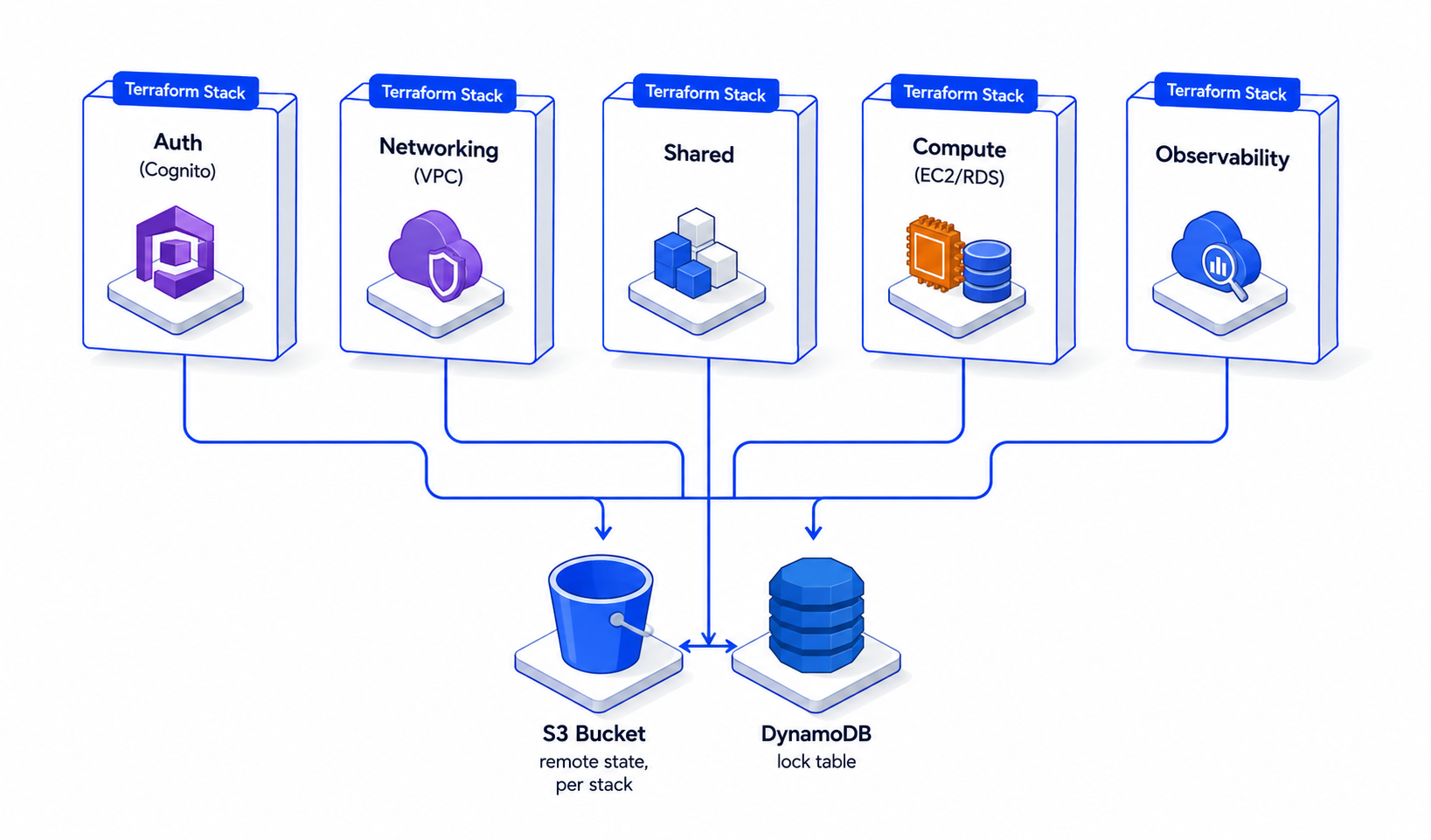
Split the footprint into five stacks — auth, networking, shared, compute, observability — each with its own root module, its own S3-backed state file, and a shared DynamoDB lock table. Configuration that's identical across environments lives in `locals.tf` files; configuration that differs lives in `environments/<env>.tfvars`. Long-running blast-radius operations (compute, RDS) are deliberately separate from frequently-changing operations (auth, observability) so the latter can iterate without putting the former at risk.
S3 backend with bucket versioning enabled — every state change is recoverable; a corrupted state file can be rolled back to a known-good revision.
S3 server-side encryption (SSE-S3) on the state bucket — state files contain resource attributes that may include secrets references.
DynamoDB lock table is single-region (ap-south-1) and shared across all stacks. Lock contention is per-stack-key, so cross-stack work runs in parallel.
`locals.tf` per stack drives the for_each over environments — one schema attribute added in locals propagates to all four user pools on the next apply.
lifecycle { ignore_changes = [...] } applied surgically on append-only AWS APIs (Cognito user-pool schema, RDS final_snapshot_identifier) to avoid Terraform fighting AWS limitations on every plan.
Architecture
Five independently-applicable stacks, each with its own state, sharing a single lock table. The stack you change is the stack you risk — auth changes can't accidentally rebuild RDS.
Workflow diagram
01
Engineer edits a stack
Change goes into the relevant root module — auth, networking, compute, observability, or shared. Each stack is a self-contained Terraform project.
02
terraform plan
Terraform reads the stack's state from S3, queries AWS for actual resource state, and prints a diff: what will be created, updated, or destroyed.
03
DynamoDB lock acquired
Before any write to S3 state, Terraform writes a lock record into the DynamoDB lock table. Any other engineer running plan/apply against the same stack-key blocks here until the lock releases.
04
terraform apply
AWS API calls executed in dependency order. State file in S3 rewritten — bucket versioning means the previous state is preserved as an old version.
05
Lock released
On apply success or failure, the DynamoDB lock record is deleted. Other engineers can now plan/apply against this stack.
06
lifecycle ignores append-only API quirks
For resources whose AWS API forbids deletion (Cognito user-pool schema, certain RDS attributes), lifecycle { ignore_changes = [...] } makes Terraform treat manual or accidental removals as silent no-ops rather than failing forever.
Engineering decisions
Why per-stack state, not a monolithic state file
A monolithic state means every plan reads and re-evaluates every resource. With ~thousands of resources across the footprint, plan time becomes minutes and the blast radius of a botched apply touches everything. Per-stack state means an auth change reads only the auth resources — fast plan, contained risk.
Why DynamoDB for state locking, not S3 conditional writes
DynamoDB has a sub-50ms put-with-condition primitive purpose-built for this. Terraform's S3 backend integrates with DynamoDB natively — `dynamodb_table` is the documented locking mechanism. S3-only locking via conditional writes is slower and more failure-modes-prone.
Why lifecycle { ignore_changes = [schema] } on Cognito
Cognito's user-pool API supports adding schema attributes but not removing or modifying them. Without ignore_changes, any Terraform plan that tries to remove a custom attribute fails forever. The lifecycle rule makes Terraform treat schema as 'I'll add via this resource, AWS will handle the rest' — deletes are silently skipped.
Why locals over module variables for environment fan-out
When a value is identical across all four environments (a schema attribute, a password policy), it's a property of the module — locals.tf. When a value differs per environment (CIDR block, instance size), it's a property of the call — environments/<env>.tfvars. This split makes the diff for 'add a new claim to all pools' a one-file change.
Code highlights
Remote backend configurationhcl
terraform {
  required_version = ">= 1.5"

  backend "s3" {
    bucket         = "terraform-<account-id>"
    key            = "auth/terraform.tfstate"
    region         = "ap-south-1"
    dynamodb_table = "terraform-state-locking"
    encrypt        = true               # SSE on state at rest
  }
}
Adding a new environment-scoped variable is one diff and one `terraform apply`. Drift is detected on the next plan rather than discovered during an outage. Onboarding a new engineer takes minutes — they `terraform init` against the right S3 backend and they have read access to whatever they have IAM rights for. The DynamoDB lock has prevented at least one prod-impact race condition where two engineers were independently iterating on the same compute stack.