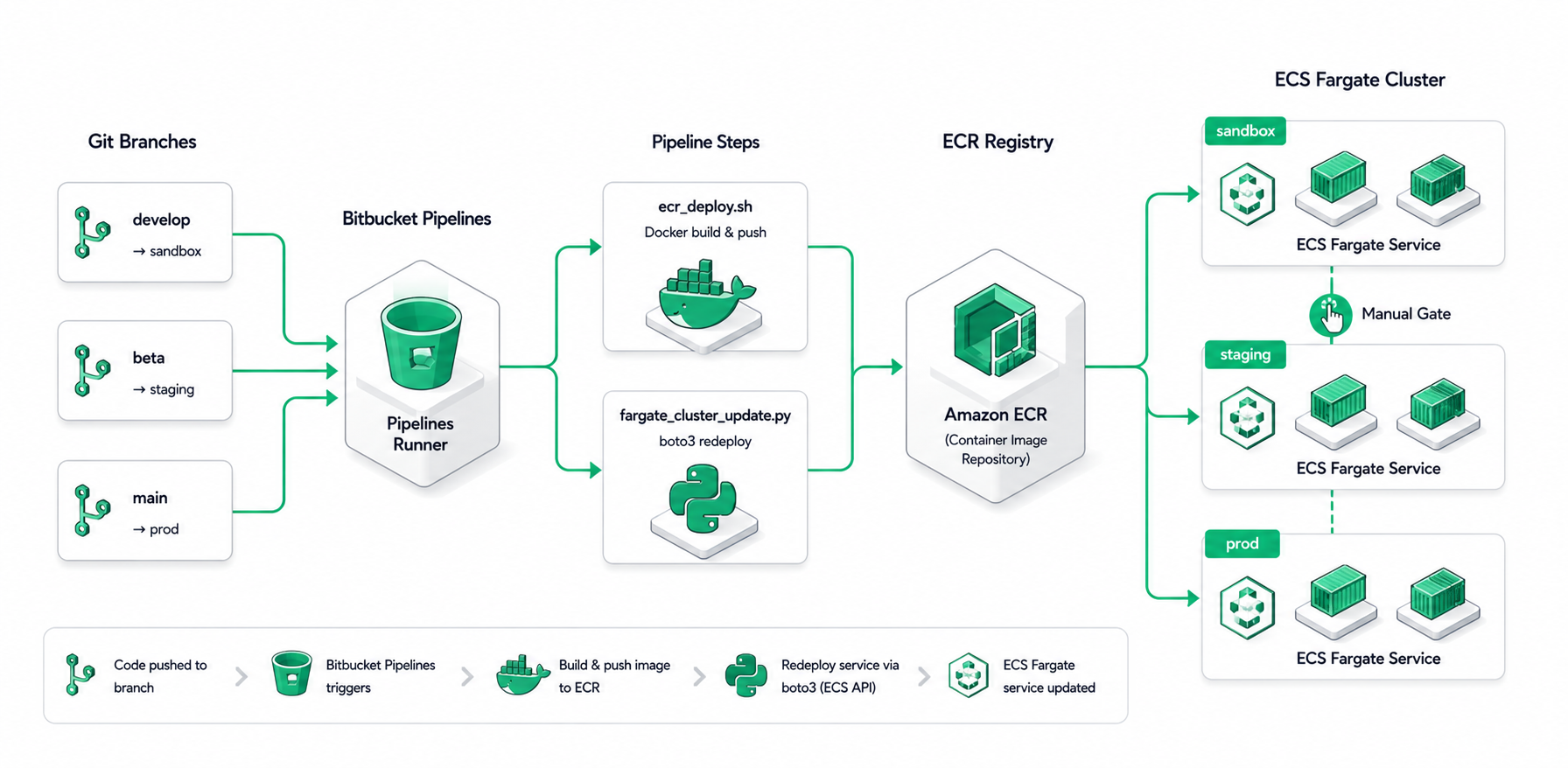
Branch-gated container delivery with environment-scoped secrets and a manual prod approval
DockerECRECS FargateBitbucket Pipelinesboto3
Context
Service deploys were a manual ritual: build the Docker image on a developer laptop, log into ECR through the AWS console, push, click through to ECS, force a redeploy, hope nothing breaks. Deploys took 20+ minutes per environment, the same image often shipped to dev and prod without re-validation, and accidental tag promotion (pushing the wrong build to prod) happened more than once.
The challenge
Build a delivery pipeline that takes a git branch, maps it to a target environment, bakes in environment-scoped secrets at build time, pushes the image to a per-env ECR repo, and rolls ECS Fargate tasks. Production must require an explicit human approval — never auto-promote from sandbox without a click.
Approach
Authored `ecr_deploy.sh` as the single source of truth for build-and-push, parameterized by environment. The script: (1) maps env name to a Bitbucket variable group, (2) validates required secrets exist and are non-empty, (3) builds a linux/amd64 Docker image with build-args for runtime config, (4) authenticates with ECR via short-lived password, (5) pushes :latest to the per-env ECR repo. After push, a Python boto3 helper (`fargate_cluster_update.py`) calls `ecs.update_service(forceNewDeployment=True)` — the ECS service pulls :latest and rotates tasks gracefully. Wired into Bitbucket Pipelines with branch mapping and a `changesets` filter so unrelated services don't rebuild.
Branch → environment mapping is explicit, not inferred: develop → dev, beta → beta, main → sandbox → manual approval gate → prod.
Changesets filter (`changesets: { includePaths: [...] }`) means a pure-Streamlit change rebuilds only the Streamlit zip pipeline — not the API container.
linux/amd64 build platform is explicit. Mac M-series defaults to arm64 which doesn't match Fargate's amd64 runtime; without `--platform linux/amd64`, the image fails to start.
Secrets are baked at build time (--build-arg) for runtime config that doesn't change between deploys; truly secret values stay in Bitbucket repository variables and are read at deploy time, never committed.
forceNewDeployment is required because pushing :latest doesn't change the ECS task definition — without it, ECS would keep running old tasks indefinitely.
Architecture
A push to a branch deterministically lands an image in the matching environment, with production gated behind a click that a human must take.
Workflow diagram
01
git push <branch>
Branch determines target environment, secret group, and ECR repo. The mapping lives in bitbucket-pipelines.yml — explicit, auditable.
02
Pipeline triggered with changeset filter
Bitbucket Pipelines runs only the steps whose `changesets: includePaths` matches the diff. A doc-only commit triggers nothing; an API-only change rebuilds only the API.
03
ecr_deploy.sh runs
Resolves env-specific secrets from Bitbucket variables, validates required vars are non-empty (fails fast on missing secrets), authenticates with ECR via aws ecr get-login-password, then `docker build --platform linux/amd64`.
04
Push to ECR
Image tagged as <repo>:latest and pushed to the per-env ECR repository. ECR's image scanner runs in the background.
05
Force ECS redeploy
fargate_cluster_update.py calls ecs.update_service(forceNewDeployment=True). ECS pulls the new :latest, starts fresh tasks, and gracefully drains the old ones via the configured deployment policy.
06
Manual prod gate (main branch only)
After sandbox deploys cleanly, the prod step is queued but doesn't run — it requires a human to click 'Run' in the Bitbucket UI. This has caught accidental promotions more than once.
Engineering decisions
Why force-new-deployment, not a tag bump
Bumping to a unique tag (e.g., :git-sha) and updating the ECS task definition would also work, but requires a task-def rev per deploy and additional plumbing. Pushing :latest + forceNewDeployment is simpler and cheaper, and ECS's deployment policy handles drain/replace correctly.
Why explicit linux/amd64
Fargate runs on amd64. Without `--platform linux/amd64`, a build on Mac M-series produces an arm64 image. The image pushes successfully (ECR doesn't care), then fails to start in Fargate with 'exec format error'. Explicit platform ensures the image and the runtime match.
Why a manual prod gate, not auto-promote
Sandbox passing doesn't mean prod is the right time to ship — there's an investor demo running, on-call just changed, customer escalation in flight. A human gate keeps deployment control with someone who knows what's happening operationally, while sandbox deployment stays auto and frictionless for testing.
Why changeset filtering
Without changeset filters, every push to main would rebuild every container in the monorepo. With six services, that's six redundant builds for what's often a one-service change. `changesets: { includePaths }` reads the git diff and skips steps whose paths weren't touched.
#!/usr/bin/env bash
# ecr_deploy.sh — builds and pushes per environment
set -euo pipefail

env="$1"                                          # dev | beta | sandbox | prod
case "$env" in
  dev)     repo="api-dev"     ;;
  beta)    repo="api-beta"    ;;
  sandbox) repo="api-sandbox" ;;
  prod)    repo="api"         ;;
  *) echo "unknown env: $env"; exit 2 ;;
esac

# Validate required env-specific secrets are set
for v in DB_HOST OPENAI_API_KEY OTEL_EXPORTER_OTLP_ENDPOINT; do
  k="${env^^}_$v"                                # e.g. DEV_DB_HOST
  : "${!k:?missing required secret: $k}"
done

# Authenticate with ECR
aws ecr get-login-password --region ap-south-1 \
  | docker login --username AWS --password-stdin \
    "$AWS_ACCOUNT.dkr.ecr.ap-south-1.amazonaws.com"

docker build \
  --platform linux/amd64 \
  --build-arg "DB_HOST=${!env^^}_DB_HOST" \
  -t "$repo:latest" .

docker tag "$repo:latest" "$AWS_ACCOUNT.dkr.ecr.ap-south-1.amazonaws.com/$repo:latest"
docker push "$AWS_ACCOUNT.dkr.ecr.ap-south-1.amazonaws.com/$repo:latest"
Impact
A push to `develop` reaches dev in under five minutes, fully hands-off. The manual prod gate has caught at least one accidental tag promotion. Multi-service repo behavior is correct: a Streamlit-only change doesn't waste CI minutes rebuilding the API container, and the API change in the same PR redeploys only the API service.