Acumatica ERP customizations were deployed entirely by hand: open the ERP admin portal, upload the customization package, click publish, click confirm, watch logs, hope nothing breaks. Rolling back was even more painful — re-upload an older package by hand. A typical deploy took 30 minutes per environment, and humans regularly fat-fingered package versions, env selections, or skipped the backup step.
The challenge
Build a Jenkins pipeline that picks up customization source from version control, packages it via MSBuild, takes a pre-deployment backup of the current state, deploys via Acumatica's REST APIs, runs a post-deploy health check, and automatically rolls back on health-check failure.
Approach
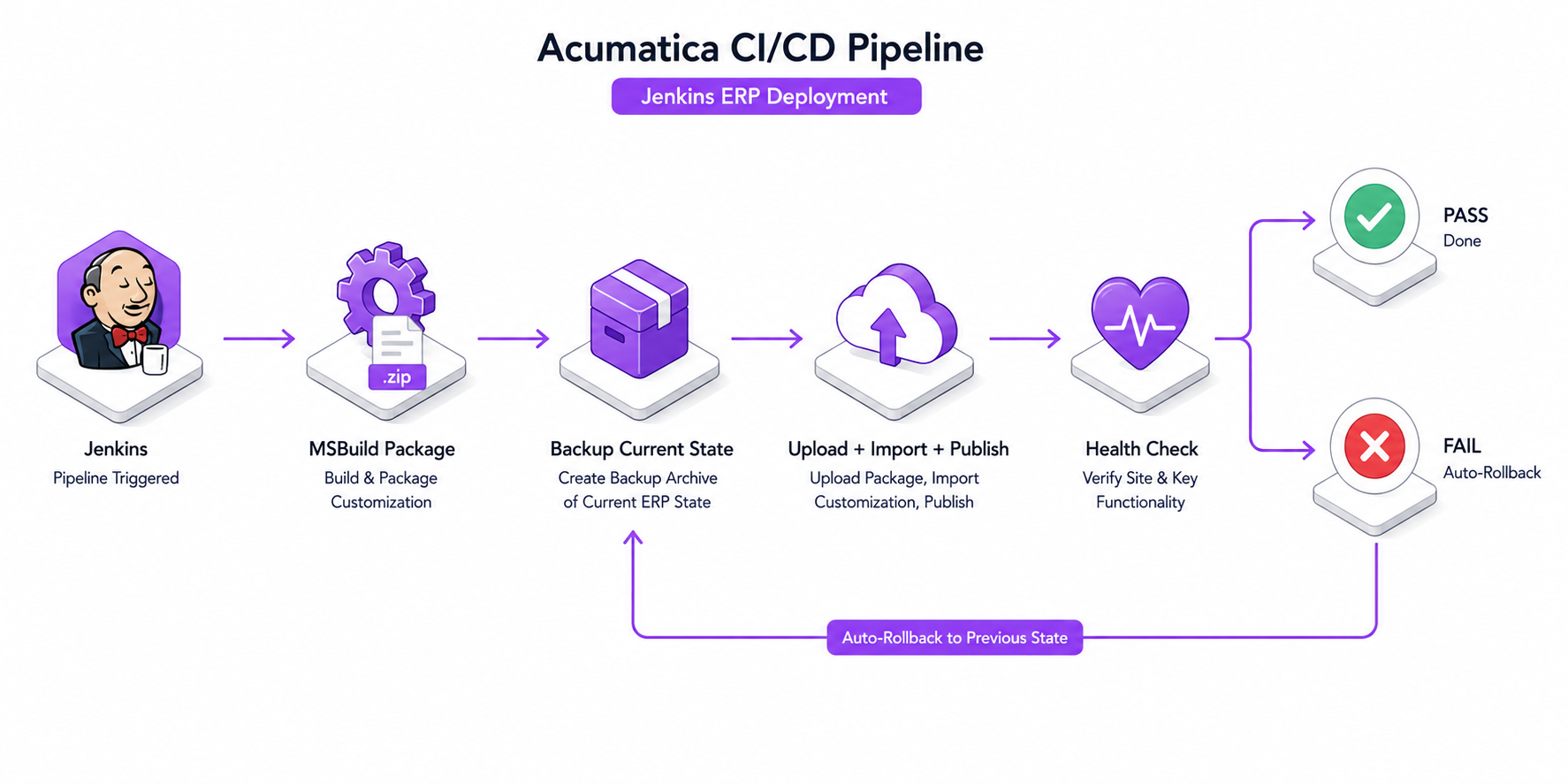
Authored a Jenkinsfile (declarative pipeline, Groovy) orchestrating the full flow: source checkout → MSBuild → snapshot existing customization via Acumatica REST → REST upload + import + publish via PowerShell → post-deploy probe → automatic restore from snapshot if the probe fails. Credentials are stored in Jenkins's credential store and injected as masked env vars at runtime — never in config files, never in version control.
MSBuild package step compiles the customization project and produces a versioned .zip — output filename includes the git short SHA so you can trace any deployed package back to source.
Backup is via Acumatica's exportCustomization REST endpoint — creates a snapshot of the currently-deployed customization that can be re-uploaded as-is.
Deploy is upload → import → publish, three REST calls in sequence. Each call validates Acumatica's response status before proceeding.
Post-deploy probe hits a known-good ERP endpoint (login + a representative read query). If the response is non-200 or takes longer than the budgeted timeout, the pipeline declares failure.
Automatic rollback re-uploads the backup .zip taken in step 3 and republishes — restores the exact pre-deploy state.
Architecture
Every deploy produces a recoverable snapshot before it changes anything. If the new package breaks the post-deploy probe, the snapshot is restored automatically and the pipeline reports failure.
Workflow diagram
01
Job triggered
Manual run from the Jenkins UI or webhook from the customization source repo (push or merge).
02
Build the package
MSBuild compiles the customization project and produces a versioned .zip — filename includes the git short SHA so deployed packages are always traceable to source.
03
Snapshot the live customization
Acumatica's exportCustomization REST endpoint produces a .zip snapshot of the currently-deployed customization. Stored on the Jenkins agent for the duration of the pipeline.
04
Deploy: upload → import → publish
Three sequential REST calls, scripted in PowerShell. Each call validates the response status; any failure halts the pipeline before publishing.
05
Probe post-deploy health
Hit a representative ERP endpoint (login + a known-good read). If response is non-200 or exceeds the timeout, declare failure.
06
Rollback or done
On probe pass, the pipeline goes green and the snapshot is discarded. On probe fail, the snapshot is re-uploaded and republished automatically — the system is restored to its pre-deploy state.
Engineering decisions
Why Acumatica's REST API, not UI automation
UI scripting (Selenium against the Acumatica admin) was the prior path — and it broke on every Acumatica UI tweak. The REST API is contract-stable: as long as Acumatica's documented endpoints exist, the pipeline works. UI scripts are brittle by definition.
Why pre-deploy snapshots, not just version control
Source control has the old code, but a deployed Acumatica customization includes generated bindings, screen IDs, and project state that aren't fully reproducible from source. A REST snapshot captures the runtime state exactly — restoring from snapshot is byte-equivalent to the pre-deploy state.
Why automatic rollback on probe failure
The most expensive error is 'deploy succeeded, system is broken, no one notices for 20 minutes'. An automatic rollback on probe failure means broken deploys self-revert in seconds — the worst case is a red pipeline, not a broken production ERP.
Why Jenkins credential store, not config files
Acumatica admin credentials must never live in a build artifact or version control. Jenkins's credential store injects them as masked env vars at job runtime — they exist only inside the running pipeline, masked in logs, gone when the job finishes.
Impact
Deployments dropped from ~30 min manual to under 5 min hands-off. Rollback is automatic and exercised on every release that fails the probe — the recovery path is no longer untested. Zero manual config-file edits; zero accidental cross-environment package uploads.